Synchronous vs Asynchronous JavaScript
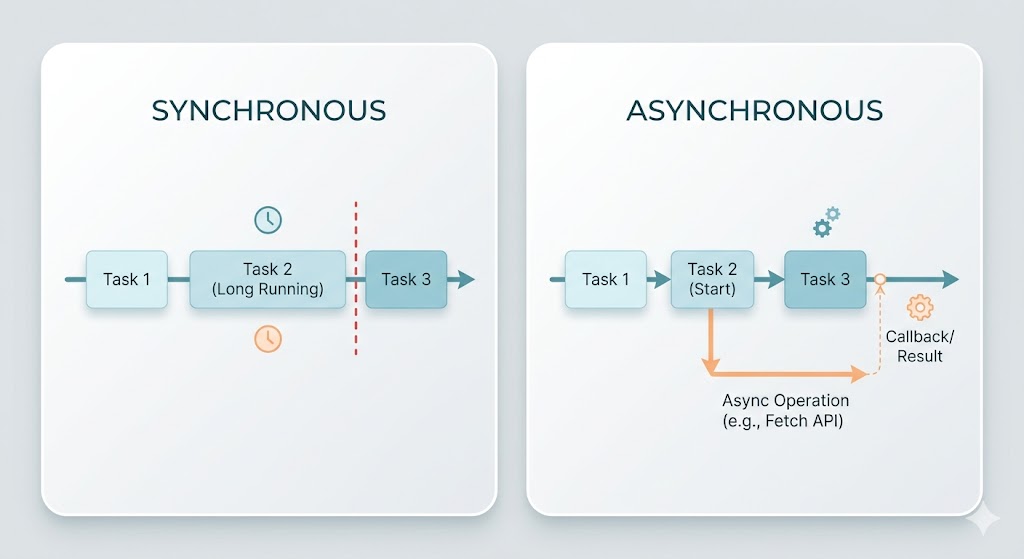
Before you can truly understand callbacks, promises, or async/await, there is a more fundamental question worth sitting with: what does it actually mean for code to be synchronous or asynchronous, and why does the distinction matter in JavaScript specifically?
This is the concept everything else builds on. Get it clear here, and a lot of things that seem complicated about JavaScript start to make sense on their own.
How Synchronous Code Works
Synchronous code runs in sequence. One line executes, finishes completely, and only then does the next line begin. Nothing overlaps. Nothing happens out of order.
console.log("First");
console.log("Second");
console.log("Third");
This prints exactly what you expect, in exactly the order you wrote it. Line one runs and finishes. Line two runs and finishes. Line three runs and finishes.
This is the default mental model most people bring to programming, and it holds up well for simple scripts. The code does what it says, in the order it says it, and you can read it top to bottom like a list of instructions.
The problem surfaces the moment one of those instructions takes time.
const data = readFileFromDisk("large-file.txt");
console.log("File loaded");
processData(data);
If readFileFromDisk is synchronous, the second line does not run until the file is fully loaded. For a small file, that might be imperceptible. For a large file, or a slow disk, or a network request that takes seconds, the entire program freezes. Nothing else happens. Nothing else can happen. The thread is occupied, waiting.
In a browser, this means the page becomes unresponsive. Clicks do nothing. Animations stop. The interface locks up until the operation finishes. In a server environment, every other incoming request queues up behind the one that is blocking. One slow operation can hold up everything else.
This is the core limitation of synchronous code: it cannot wait and work at the same time.
How Asynchronous Code Works
Asynchronous code breaks that limitation. Instead of stopping to wait for a slow operation, it starts the operation, registers what to do when it finishes, and moves on immediately. The result comes back later, and the code that depends on it runs then.
console.log("Starting");

setTimeout(() => {
  console.log("This runs later");
}, 2000);

console.log("This runs now");
The output is:
Starting
This runs now
This runs later
The third line printed before the callback inside setTimeout, even though setTimeout was called first. JavaScript did not wait for the two seconds to pass. It registered the callback, moved on, and came back to run it when the timer expired.
This is the key shift in thinking: in asynchronous code, the order things are written is not necessarily the order they execute. The sequence depends on when operations complete, not on where they appear in the file.
Why JavaScript Needed Asynchronous Code
JavaScript was originally built for browsers. Browsers deal with things that take unpredictable amounts of time: fetching data from a server, reading files, waiting for user input. If JavaScript could only run synchronously, a single network request would freeze the entire browser tab until the response arrived.
On top of that, JavaScript runs on a single thread. There is no second thread to hand blocking work off to. When the thread is busy waiting, it cannot do anything else at all. The event loop, which drives everything in JavaScript, cannot process new events, respond to clicks, run other code, or do anything until the current operation finishes.
Asynchronous code works around this by never actually blocking the thread. Slow operations are handed off to the browser or the operating system, which handles them in the background. When they finish, the result is placed in a queue. The event loop picks it up when the thread is free and runs the associated callback. The thread stays available throughout, and the program stays responsive.
This is why asynchronous programming is not optional in JavaScript. It is built into the language's design at a fundamental level.
The Difference in Practice
Consider two versions of the same task: fetching a user from an API and logging their name.
Synchronous thinking would be:
1. Fetch the user
2. Wait until we have the user
3. Log their name
Steps one and two are fused. Nothing else happens between them. The world pauses.
Asynchronous thinking is:
1. Start fetching the user
2. Move on, do other things
3. When the user arrives, then log their name
Steps one and two are decoupled. The rest of the program keeps running. When the data is ready, it is handled.
In JavaScript, this asynchronous thinking is expressed first through callbacks, then promises, then async/await. Each is a different syntax for expressing the same underlying idea: start this, come back when it is done.
What Stays Synchronous
Not everything in JavaScript is asynchronous, and it should not be. Mathematical operations, string manipulation, array methods, loops, conditionals: all of these are synchronous and should be. They are fast enough that blocking the thread for their duration is irrelevant.
Asynchronous handling is reserved for operations that interact with the outside world and take unpredictable time:
Network requests to APIs or servers
Reading from or writing to the file system
Timers and delays
Database queries
User input events
Anything that requires waiting for something outside the JavaScript engine itself is a candidate for asynchronous treatment. Everything else runs synchronously, and that is fine.
The Mental Model to Carry Forward
Think of synchronous code as a single lane road. One car at a time. If the car at the front stops, everything behind it stops too.
Asynchronous code is more like a kitchen. Multiple dishes are being prepared. The chef starts the pasta, puts it on to boil, and while it cooks starts chopping vegetables. The pasta does not require the chef to stand and stare at it. When it is ready, the chef comes back to it. Multiple things are in progress at the same time, even though there is only one chef.
The single thread is the chef. Asynchronous operations are the things cooking in the background. The event loop is what keeps the chef checking what is ready and knowing when to return to each task.
This model scales to everything else you will learn about JavaScript's async behavior. The mechanisms change, the syntax evolves, but the underlying idea stays the same: start work, move on, come back when it is done.
Wrapping Up
Synchronous code is simple, predictable, and the right choice for fast operations. Asynchronous code is what makes JavaScript practical for the real world, where operations take time, responses are delayed, and a frozen interface is never acceptable.
The distinction is not about which style is better. It is about matching the tool to the task. Understanding when code is synchronous, when it is asynchronous, and why JavaScript draws that line where it does is what makes everything built on top of it, callbacks, promises, async/await, the event loop, make sense as a coherent system rather than a collection of unrelated features.


