Storing Uploaded Files and Serving Them in Express
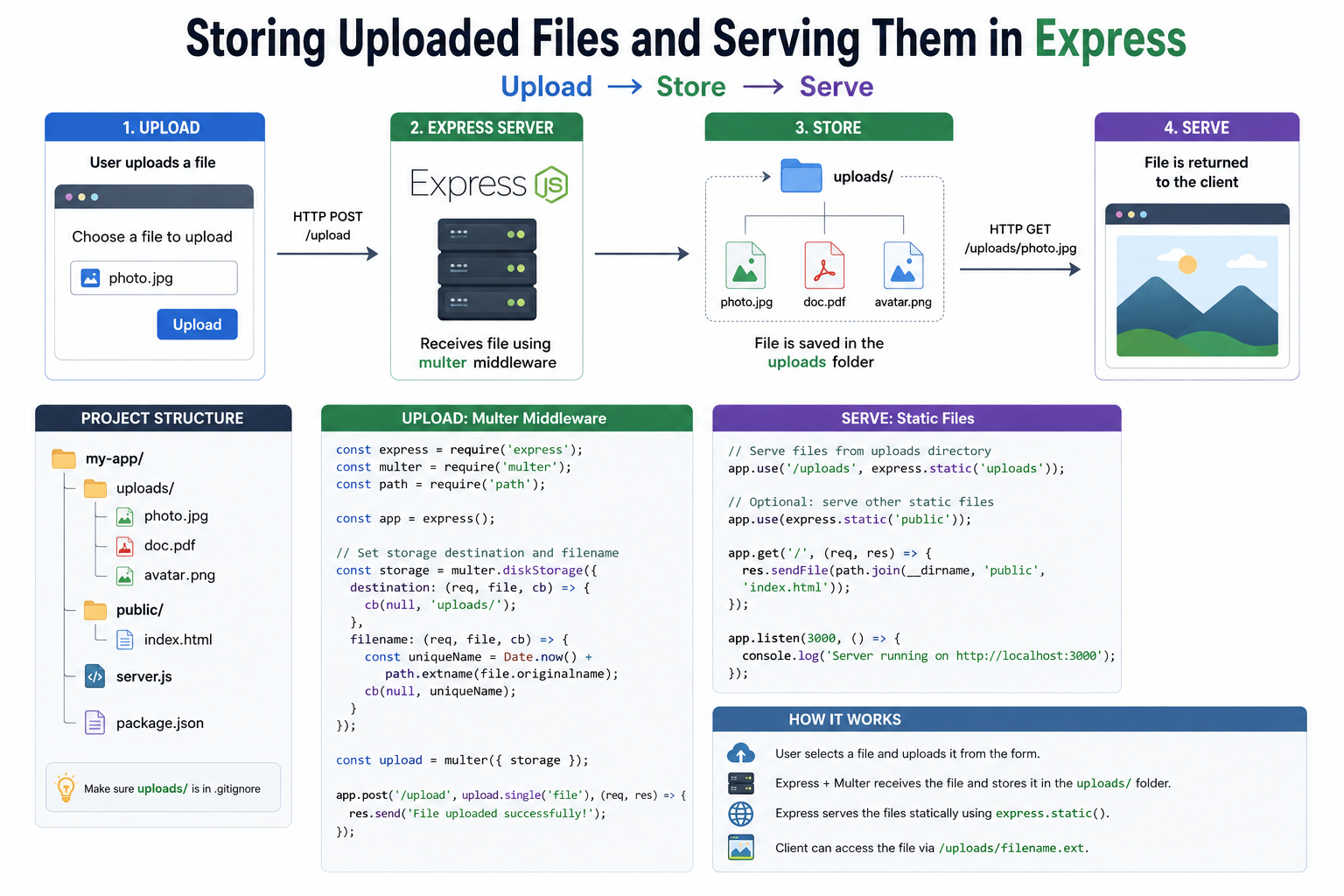
Most web applications eventually need to handle files. A user uploads a profile picture, attaches a document, or submits a form with an image. The file arrives at your server, and suddenly you need to answer a question that seems simple but has real depth to it: where does this file actually go, and how do people access it later?
This post walks through how file storage works in Express, the difference between keeping files on your own server versus handing them off to an external service, and how to serve those files back to users safely and correctly.
Where Uploaded Files Are Stored
When a file reaches your Express server, it does not store itself anywhere automatically. You have to tell Express what to do with it.
The most common starting point is saving files directly to a folder on the same machine your server runs on.
You create a directory in your project, something like uploads/, and every incoming file gets written there.
Each file sits on disk with a name, a path, and a size, just like any other file on your computer.
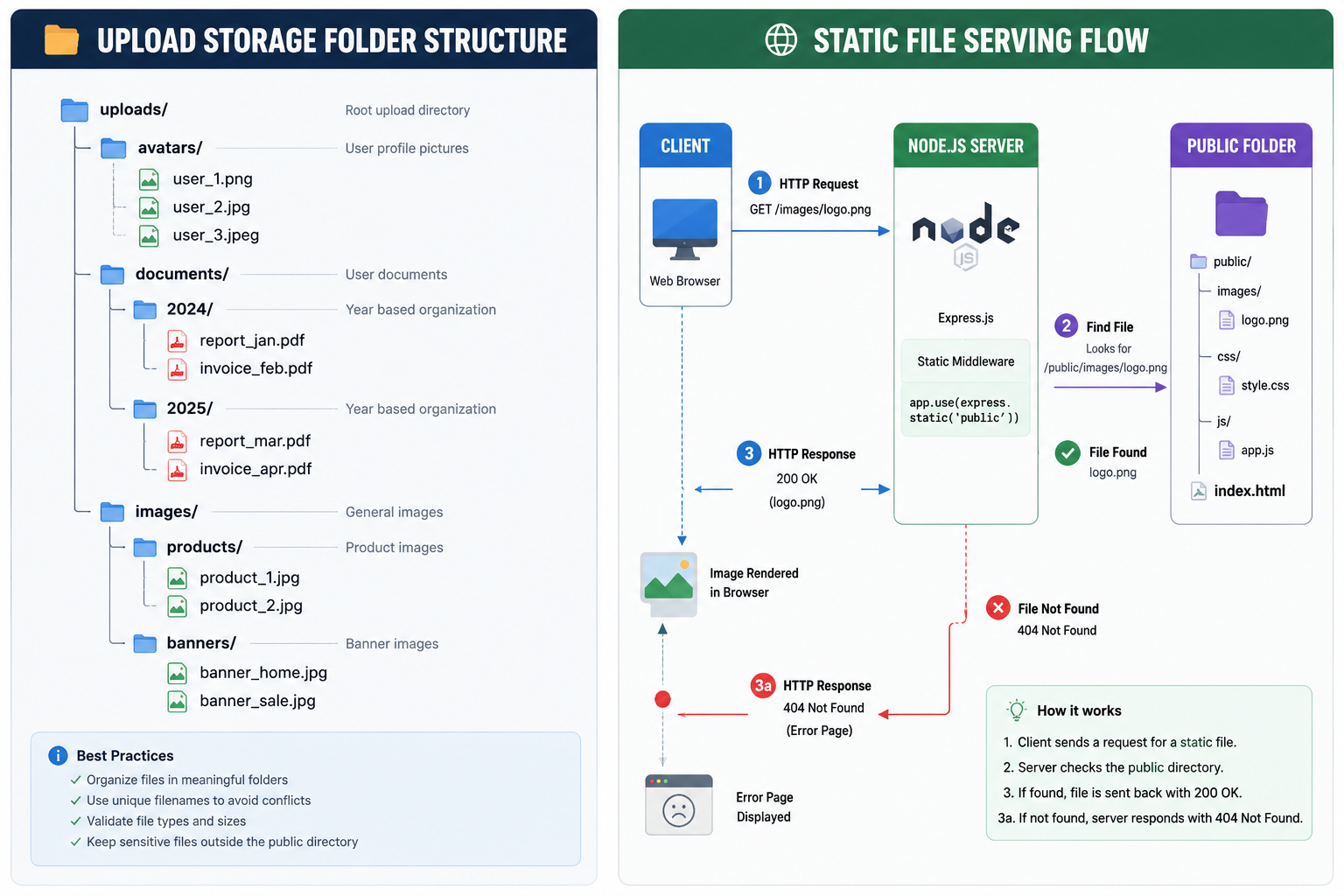
A typical folder structure might look like this:
project/
  uploads/
    images/
      avatar-1.png
      avatar-2.jpg
    documents/
      report.pdf
Organizing uploads into subfolders by type keeps things manageable as the number of files grows.
Dropping everything into a single flat folder works at first but becomes difficult to navigate and maintain over time.
The most widely used library for handling file uploads in Express is Multer.
It processes incoming multipart form data and gives you control over where files land, what they are named, and which file types are allowed through.
Multer sits between the incoming request and your route handler, doing the heavy lifting of reading the file stream and writing it to disk before your code even runs.
Local Storage vs External Storage
Storing files locally is the quickest path from zero to working. There is no third-party service to configure, no additional cost, and no network round-trip to an external system.
For small projects, prototypes, or internal tools, it is often exactly the right choice.
But local storage has limits that become visible as applications grow.
The first is scale.
A single server has a fixed amount of disk space. As uploads accumulate, that space fills up.
Expanding storage means either upgrading the server or adding more servers, and if you add more servers, you run into the next problem immediately.
The second is consistency across servers.
If your application runs on multiple servers behind a load balancer, a file uploaded to server A is not automatically available on server B.
A user who uploads a file and then makes a request that gets routed to a different server might find their file missing.
Local storage makes this a real headache.
External storage solves both problems. Services like Amazon S3, Cloudflare R2, and Google Cloud Storage are dedicated file storage systems. When a file is uploaded, your server receives it and immediately forwards it to the external service. The file lives there, not on your server. Any of your servers can retrieve it via a URL at any time, because it lives in one consistent place.
The tradeoff is complexity.
External storage requires API credentials, additional code to handle the upload handoff, and a small amount of latency on the upload path. For production applications serving real users, that tradeoff is almost always worth making.
Serving Static Files in Express
Once files are stored, you need a way for users to retrieve them. This is where static file serving comes in.
Express has a built-in middleware called express.static that maps a folder on your server to a URL path.
Any file sitting in that folder becomes accessible at a predictable URL without you writing individual route handlers for each one.
If you tell Express to serve your uploads/ folder at the /files path, then a file stored at uploads/images/avatar-1.png becomes accessible at yoursite.com/files/images/avatar-1.png.
The folder structure maps directly to the URL structure.
This is the concept of static file serving: Express reads the file from disk and sends it as a response when someone requests that URL. No database query, no dynamic rendering.
Just a file being read and delivered.
One thing worth understanding is the difference between static and dynamic responses. A static file response is the same every time.
It does not depend on who is asking or what state the application is in.
A dynamic response is generated on the fly, often from a database, and can vary per user or per request.
Uploaded files are usually served statically, because the file itself does not change between requests.
Accessing Uploaded Files via URL
For users to access an uploaded file, they need a URL.
This means two things have to be true: the file must exist at a known location on disk, and Express must be configured to serve that location.
When a file is saved, you should store a reference to it. In practice this usually means saving the file path or the generated filename to a database record.
When a user later requests their profile picture or a previously uploaded document, your application looks up that stored path and constructs the correct URL to return.
The URL a user receives might look like:
https://yoursite.com/uploads/images/avatar-1.png
That URL works as long as the file exists at the corresponding path on disk and Express is serving that directory. If the file is moved, renamed, or deleted without updating the database record, the URL breaks. Keeping the stored path and the actual file location in sync is one of the small but important responsibilities of managing local file storage.
For external storage, the same principle applies but the URL points to the external service rather than your own server. The external service handles the actual delivery of the file, often with better performance through content delivery networks built into the service.
Security Considerations for Uploads
Accepting files from users introduces risk. Files are a common attack surface, and handling them carelessly can expose your application and your users to serious problems.
Validate file types on the server. A user can rename any file to have a .jpg extension. Checking the extension alone is not enough. You should validate the actual file type by inspecting the file's MIME type or its raw bytes. Multer allows you to filter by MIME type during the upload process, rejecting files that do not match what you expect.
Rename files on arrival. Do not save uploaded files using the original filename the user provided. Filenames can contain path traversal characters or special strings designed to cause problems on the server. Generate a new, random filename for every upload. A combination of a timestamp and a random string works well. Store the original filename separately if you need it for display purposes.
Set file size limits. Without a size limit, a user can upload an enormous file and exhaust your server's disk space or memory. Multer lets you set a maximum file size, and you should always configure one.
Keep uploads outside the web root when possible. If your uploads folder is directly inside the folder Express serves as static files, any uploaded file is immediately publicly accessible by URL. For files that should only be accessed by authenticated users, store them outside the publicly served directory and write a route handler that checks authentication before streaming the file back.
Do not execute uploaded files. Your server should never run an uploaded file as code. This sounds obvious, but misconfigured servers have served uploaded .php or script files and executed them when requested. Files should be read and delivered, nothing more.
Wrapping Up
File uploads touch more of your application than they first appear to. A file arrives, gets stored somewhere, gets referenced in a database, gets served back at a URL, and needs to be handled safely at every step.
Local storage is the right starting point for most projects. It is simple, requires no external services, and gets you moving quickly. As your application grows, external storage picks up where local storage falls short, handling scale and multi-server consistency without you having to think about it.
The fundamentals stay the same either way: know where your files live, serve them consistently, and never trust what a user sends you without checking it first.
You are all set!
written by theadroitdev(Shivam Verma) :)
X → https://x.com/theadroitdev
Github → https://github.com/TheAdroitDev
ChaiCode Repo → https://github.com/TheAdroitDev/ChaiCode-Cohort-2026


