The Node.js Event Loop Explained
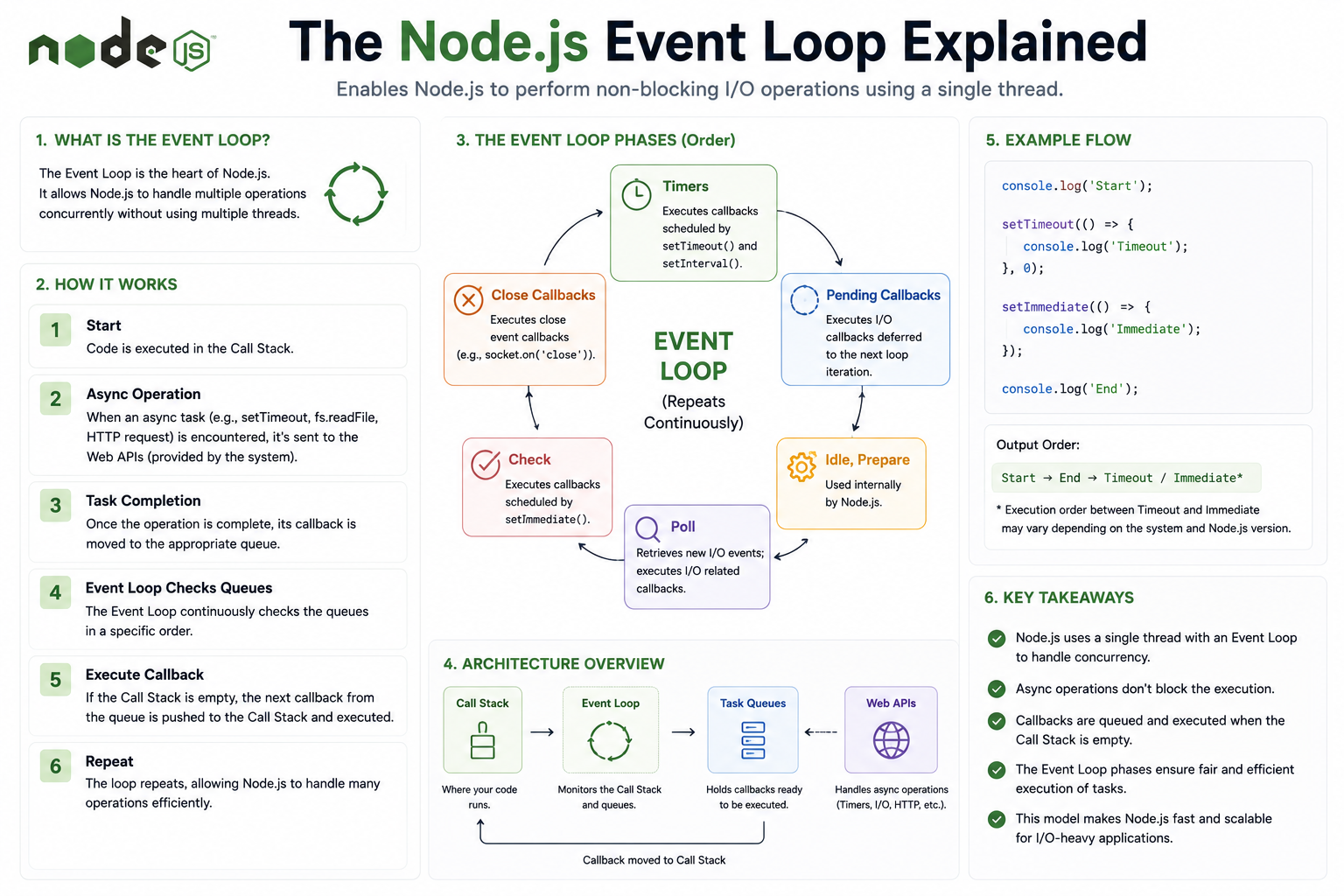
I highly recommend reading this part of docs explaining NodeJS Event Loop.
If you have spent any time with Node.js, you have probably heard that it is single-threaded but somehow handles thousands of concurrent connections. That sounds like a contradiction. One thread, many things happening at once. The event loop is what makes it possible, and understanding it changes how you think about every line of asynchronous code you write.
The Single-Thread Problem
Most programming environments handle concurrency by creating multiple threads. One request comes in, one thread handles it. Another request comes in, another thread spins up. The threads run in parallel, each working on its own task independently.
Node.js does not do this. All of your JavaScript runs on a single thread. There is one call stack, one sequence of execution, and at any given moment, only one piece of code is actually running.
This creates an obvious question. If only one thing can run at a time, how does Node.js handle a database query coming back while also processing a new incoming request while also running a timer? How does it stay responsive under load instead of processing one thing at a time in a long queue?
The answer is that Node.js was designed around a simple but powerful insight: most server-side work is not actually computation. It is waiting. Waiting for a database to respond. Waiting for a file to load. Waiting for a network request to complete. If you can handle that waiting without blocking the thread, one thread can keep a lot of plates spinning.
The event loop is the mechanism that makes that possible.
What the Event Loop Is
The event loop is a continuously running process that sits at the heart of Node.js. Its job is straightforward: check if there is work to do, do it, and check again. It keeps cycling for as long as your application is running.
Think of it as a highly attentive task manager working a help desk. The task manager has a queue of tasks on one side and a desk where one task is handled at a time. When a task comes in that requires waiting for something external, the task manager does not sit and stare at the phone waiting for a callback. They set the task aside, work on the next one, and when the callback comes in, they add the completion back to the queue and get to it in turn.
That cycle, check the queue, handle what is ready, move on, check again, never stops. It is the loop in event loop.
The Call Stack and the Task Queue
To understand how the event loop works, you need a picture of two things operating alongside each other: the call stack and the task queue.
The call stack is where your code actually runs. When you call a function, it goes onto the stack. When that function calls another function, that goes on top. When a function finishes, it comes off the stack. JavaScript works through the stack one frame at a time, top to bottom.
The task queue is a waiting area for work that is ready to run but not running yet. When an asynchronous operation completes, its callback does not jump straight onto the call stack. It waits in the queue.
The event loop connects the two. When the call stack is empty, the event loop looks at the task queue. If there is something waiting, it takes the first item and pushes it onto the call stack. That item runs, finishes, comes off the stack, and the event loop looks at the queue again.
This is why asynchronous JavaScript behaves the way it does. Callbacks do not interrupt whatever is currently running. They wait until the stack is clear, and only then does the event loop give them their turn.
console.log("First");

setTimeout(() => {
  console.log("Third");
}, 0);

console.log("Second");
Even though the timeout is set to zero milliseconds, it prints last. The callback goes into the task queue immediately, but the event loop does not pick it up until the call stack is empty. The two console.log calls finish first, the stack clears, and only then does the event loop pull the timeout callback through.
How Async Operations Are Actually Handled
When Node.js encounters an operation that would take time, reading a file, making a network request, querying a database, it does not run that operation on the main thread. It hands it off.
Underneath Node.js sits a library called libuv, which manages a pool of background workers and hooks into the operating system's own mechanisms for asynchronous I/O. These handle the slow work while the JavaScript thread keeps running.
Your code registers a callback: when this operation completes, run this function. Node.js notes that, hands the operation to libuv, and moves on immediately. The main thread is free. The event loop keeps cycling. Other requests come in and get handled.
When the background operation finishes, libuv signals the event loop. The callback associated with that operation is placed into the task queue. The event loop picks it up when the call stack is clear and runs it.
From your perspective as a developer, you wrote a function and told Node.js to call it when something finished. From the runtime's perspective, a substantial amount of machinery coordinated to make that happen without ever blocking your thread.
Timers vs I/O Callbacks
Not all callbacks are treated identically. Node.js distinguishes between different categories of async work, and the event loop processes them with different priorities.
Timer callbacks come from setTimeout and setInterval. When a timer expires, its callback becomes eligible to run. The event loop checks timers early in its cycle. If a timer has expired and the stack is clear, the callback runs.
I/O callbacks come from file system operations, network requests, database calls, and anything else that interacts with the outside world. These are placed in their own queue and processed after timers in the event loop's cycle.
There is also a special category called microtasks, which includes promise callbacks and process.nextTick. Microtasks are given higher priority than both timers and I/O callbacks. When a microtask is queued, the event loop finishes it before moving on to anything else in the regular task queue.
This explains a common observation. Promise callbacks run before setTimeout callbacks, even if the setTimeout is set to zero:
setTimeout(() => console.log("timer"), 0);
Promise.resolve().then(() => console.log("promise"));
Output:
promise
timer
The promise callback is a microtask. The event loop processes the microtask queue before returning to the regular task queue where the timer callback is waiting.
You do not need to memorize the exact ordering of every queue to write good Node.js code. But knowing that these distinctions exist helps you reason about why callbacks run in the order they do when the behavior seems surprising.
The Event Loop and Scalability
The event loop is the reason Node.js can handle thousands of simultaneous connections with a single thread and a modest memory footprint.
In a thread-per-request model, each connection requires its own thread. Threads consume memory. Thousands of connections mean thousands of threads. The operating system spends significant effort switching between them, and memory consumption grows with every new connection.
In Node.js, connections do not consume a thread. They consume a small amount of state that is managed by the event loop. Ten thousand open connections and ten thousand threads is not the same as ten thousand open connections and one event loop. The difference in resource usage is substantial.
The event loop keeps the single thread busy doing actual work rather than blocking on waits. As long as each individual piece of JavaScript code that runs is fast, the event loop can cycle quickly, pick up completed callbacks promptly, and keep response times low even under heavy load.
This is why CPU-intensive work is the genuine weak point of Node.js. If a piece of code runs a heavy computation that takes several seconds, the call stack is occupied for those seconds. The event loop cannot cycle. No other callbacks run. Every waiting request is delayed. The single-thread model that makes I/O so efficient becomes a bottleneck the moment the thread is genuinely busy rather than just waiting.
For I/O-heavy applications like APIs, web servers, and real-time services, the event loop model fits the workload almost perfectly. For computation-heavy applications, you need either worker threads or a different tool entirely.
Wrapping Up
The event loop is not a complex idea once you see what problem it is solving. JavaScript has one thread. That thread should never block. The event loop makes sure it never has to, by continuously cycling between what is ready to run and what is still waiting, keeping the thread busy with actual work rather than idle waiting.
The call stack handles what is running now. The task queue holds what is ready to run next. The event loop connects them. Background workers handle the slow I/O so the main thread never has to wait for it. When it is done, the result comes back through the queue and gets its turn.
Every piece of asynchronous JavaScript, every callback, every resolved promise, every timer that fires, passes through this system. Understanding the loop is understanding how Node.js works at its core, and it makes every async pattern built on top of it easier to read, reason about, and debug.


