Blocking vs Non-Blocking Code in Node.js
One of the first things you learn about Node.js is that it is built for non-blocking code. The documentation mentions it, blog posts emphasize it, and experienced developers repeat it. But the explanation often stops at the label without getting into what blocking actually means in practice, why it matters for a server, and how the two approaches behave differently when real code runs.
This post works through that distinction properly, from the concept to the practical consequences.
What Blocking Code Means
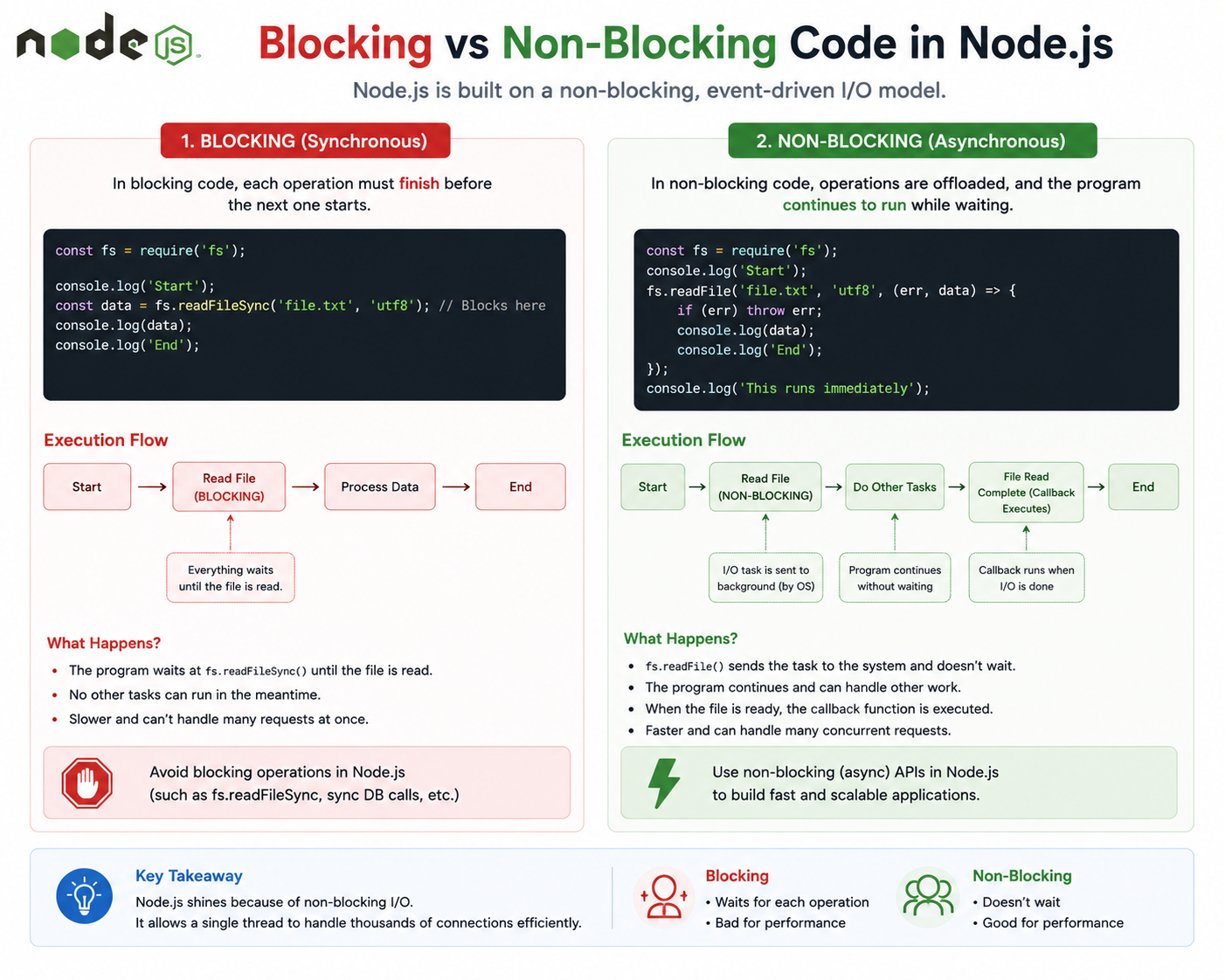
Blocking code is code that stops everything else from happening until it finishes.
When a piece of code runs synchronously and takes time, the JavaScript thread cannot move on. It is occupied. It sits and waits for the operation to complete before executing the next line. While it waits, nothing else can run. New requests queue up. Timers that should have fired do not. Callbacks that are ready to execute cannot. The entire program is held in place by one operation that has not finished yet.
The word blocking describes exactly what is happening: the thread is blocked.
Consider reading a large file from disk. In the blocking model, you ask for the file, and the thread waits. The disk spins, the data loads, the bytes come back, and only then does your code continue. The time between asking and receiving is dead time for the entire server.
For a script that runs once and exits, blocking behavior is often acceptable. You run the script, it does its work, it finishes. There is no one else waiting. But for a server handling multiple simultaneous users, that dead time has real consequences.
What Non-Blocking Code Means
Non-blocking code starts an operation and moves on immediately without waiting for the result.
Instead of holding the thread in place, non-blocking code registers what should happen when the operation completes and continues to the next task. When the operation eventually finishes, the callback or promise resolution is placed in the task queue, and the event loop picks it up and runs it when the thread is free.
The thread is never idle. While one operation runs in the background, the main thread is already handling something else. When the background operation finishes, its result gets processed in turn.
This is the non-blocking model: start, move on, come back when ready.
Why Blocking Slows Servers
Node.js runs your JavaScript on a single thread. This is not a limitation that slips through the cracks. It is a deliberate design, and non-blocking I/O is what makes it viable. But that design comes with a clear consequence: if something blocks the thread, everything stops.
Imagine a coffee shop where one barista handles every order from start to finish before taking the next. If one customer orders something that takes five minutes to prepare, every customer behind them waits five minutes before their order is even taken. The line grows. Customers leave. The shop handles far fewer customers than it could.
A server with blocking code behaves the same way. One slow database query holds up every other request. One large file read pauses the entire application. Under light load, the effect might be imperceptible. Under moderate load, response times climb. Under heavy load, the server falls behind and stays behind.
The single-threaded nature of Node.js means there is no backup thread to pick up the slack. When the main thread is blocked, the server is effectively offline for the duration.
Non-blocking code solves this by ensuring the thread is never waiting. Every slow operation happens in the background while the thread continues taking new requests, processing completed callbacks, and running whatever work is actually ready.
How Node.js Handles Async Operations
When Node.js encounters a non-blocking operation, it does not run it on the main thread. It hands it off to libuv, the underlying library that manages I/O operations and a pool of background workers. These handle the slow work using the operating system's own async capabilities.
The main thread keeps running. When the background operation completes, its callback is placed in the event loop's task queue. When the call stack is clear, the event loop picks up the callback and runs it.
From the developer's perspective, you write code that says: start this operation, and when it is done, do this. From the runtime's perspective, the work is genuinely happening in parallel with the main thread, coordinated through the event loop.
This is why non-blocking code enables a single Node.js process to handle thousands of simultaneous connections. The thread is almost never idle. It continuously processes what is ready rather than waiting on what is not.
Real-World Example: Reading a File
File reading is the canonical example because the difference between blocking and non-blocking behavior is easy to see and the real-world impact is straightforward.
Blocking file read:
const fs = require("fs");

console.log("Request received");

const data = fs.readFileSync("large-report.txt", "utf8");
console.log("File loaded:", data.length, "characters");

console.log("Response sent");
readFileSync is synchronous. The thread stops at the second line and waits until the entire file is read from disk. Only after the file is fully loaded does execution continue to the third line. If reading large-report.txt takes 200 milliseconds, the thread is blocked for 200 milliseconds. Any other request that arrived during those 200 milliseconds waits.
Non-blocking file read:
const fs = require("fs");

console.log("Request received");

fs.readFile("large-report.txt", "utf8", (error, data) => {
  if (error) {
    console.log("Error reading file:", error.message);
    return;
  }
  console.log("File loaded:", data.length, "characters");
});

console.log("Response sent");
The output order changes in a way that surprises developers encountering this for the first time:
Request received
Response sent
File loaded: 94823 characters
readFile starts the file reading operation and returns immediately. The thread moves on and prints Response sent before the file has finished loading. When the file read completes in the background, the callback runs and prints the file information.
The thread was never blocked. While the disk was doing its work, the server remained free to handle other requests. That is the practical value of non-blocking code in a server context.
Real-World Example: Database Calls
Database queries follow the same pattern and carry the same implications. A query that takes 100 milliseconds is common. In a blocking model, every simultaneous request that triggers a database call queues up behind the previous one.
Blocking style (illustrative):
app.get("/user/:id", (req, res) => {
  const user = database.querySync(`SELECT * FROM users WHERE id = ${req.params.id}`);
  res.json(user);
});
If this query takes 100 milliseconds, ten simultaneous requests to this endpoint take a full second to process sequentially. The eleventh request waits a second before the server even begins working on it.
Non-blocking style:
app.get("/user/:id", (req, res) => {
  database.query(
    "SELECT * FROM users WHERE id = ?",
    [req.params.id],
    (error, user) => {
      if (error) {
        return res.status(500).json({ error: "Database error" });
      }
      res.json(user);
    }
  );
});
Each request triggers a database query and immediately frees the thread. Ten simultaneous requests each start their database queries almost simultaneously. Each query runs in the background. As they complete, their callbacks fire and responses go out. Total time approaches the duration of a single query rather than ten times that duration.
For an API serving real users, this difference is the gap between a fast application and one that degrades under load.
Recognizing Blocking Code in Practice
Node.js ships with both blocking and non-blocking versions of most file system operations. The naming convention is consistent: synchronous methods end in Sync. readFileSync, writeFileSync, existsSync. These are the blocking versions. Their counterparts without the suffix are non-blocking.
// Blocking
const content = fs.readFileSync("file.txt", "utf8");

// Non-blocking
fs.readFile("file.txt", "utf8", (error, content) => { ... });

// Non-blocking with promises
const content = await fs.promises.readFile("file.txt", "utf8");
The synchronous versions exist for specific situations where they are appropriate: startup scripts, configuration loading before a server begins accepting requests, command-line tools that run and exit. Using them inside a request handler or anywhere that runs during active server operation is almost always the wrong choice.
Heavy computation is a different category of blocking. A loop that runs millions of iterations, a complex sorting algorithm on a large dataset, image processing done entirely in JavaScript: these do not involve I/O at all, so there is no async version to reach for. They simply occupy the thread for however long they take. Handling genuinely CPU-intensive work in Node.js requires worker threads or offloading the work to a separate process.
Wrapping Up
Blocking code occupies the thread and makes everything wait. Non-blocking code starts work, moves on, and handles results when they arrive. For scripts that run and exit, the distinction rarely matters. For servers handling multiple simultaneous users, it is fundamental.
Node.js was designed around non-blocking I/O precisely because most server work is waiting: waiting for disks, waiting for databases, waiting for network responses. By never blocking the thread on that waiting, a single Node.js process can handle far more simultaneous connections than a thread-per-request model allows.
The practical rule is straightforward: in any code that runs while your server is handling requests, never block the thread. Reach for the async versions of I/O operations, use promises or callbacks, and let the event loop do what it was built to do.
There are no Limits expect the ones you make!
written by theadroitdev(Shivam Verma) :)
X → https://x.com/theadroitdev
Github → https://github.com/TheAdroitDev
ChaiCode Repo → https://github.com/TheAdroitDev/ChaiCode-Cohort-2026


