
What arrow functions are
Arrow functions was introduced in ES6+(JavaScript Standard). It is now a part of modern web development.
We already know functions are reusable block of code.
Additionally they are hoisted .
While classic function declaration is way to declare a function in a verbose way. On the other hand arrow function gives you power of clean and short code but at some cost.
Basic arrow function syntax
const addition = (a, b) => a + b
Arrow functions with one parameter
For instance,
Square operation using function declaration
let number;

function square(number){
    return number * number;
}

console.log(square(3)); // 9
From arrow function =>
let number;
const square = (number) => number * number

console.log(square(3)); // 9
More examples:
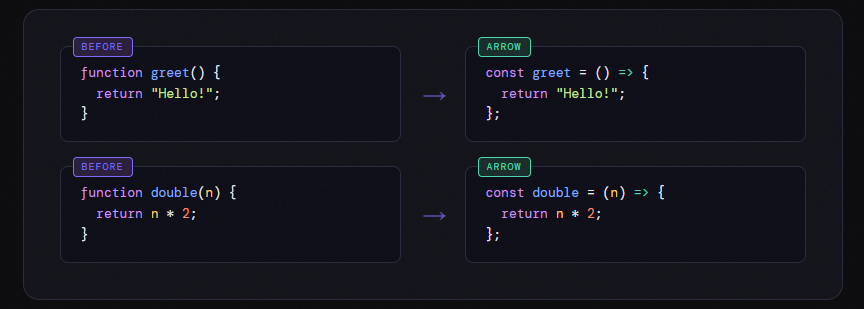
Here's the same function written two ways first the classic way, then as an arrow function:
Arrow functions with multiple parameters
const numbers = [1, 2, 3, 4, 5];

const squares = numbers.map(n => n * n);

console.log(squares);
Implicit return vs explicit return
Note: 💡
If you want multiple lines but still want to use arrow function use parenthesis () to perform the operation
const result = result.map((data)=>(
    data / 2
))
when you are using parenthesis () you actually don't need to return the value explicitly, whereas if you had used curly braces {} you need to return!;
Basic difference between arrow function and normal function
Arrow function is also known as Function expression i.e. defines a function as part of an expression, typically by assigning it to a variable.
Syntax: Arrow functions are shorter; if the body is a single expression, curly braces and the
returnkeyword can be omitted (implicit return).Hoisting: Normal function declarations are hoisted, allowing them to be called before definition. Arrow functions (as expressions) are not, and cannot be called before initialization.
Methods: Arrow functions are ideal for callbacks (e.g.,
map,filter) because they keep the surroundingthis, while normal functions are better for defining object methods that need to access
Conclusion
Arrow functions (introduced in ES6) provide a concise syntax (=>) and are great for short, single-expression functions and callbacks. They support implicit returns for single expressions and make code cleaner and more readable in many common cases.
Keep in mind:
Arrow functions have lexical
this(they capturethisfrom the surrounding scope), so they are not suitable when you need a dynamicthis(e.g., object methods that rely on their ownthis).They do not have their own
argumentsobject and cannot be used as constructors (you cannot call them withnew).When the body is enclosed in
{}, you must use an explicitreturn; for a single expression you can omit braces and thereturn.Arrow functions are function expressions (not function declarations) and therefore are not hoisted the same way function declarations are reference them only after they are defined.
In short: prefer arrow functions for concise callbacks and small utilities, but use traditional function declarations when you need hoisting, a constructor, or a function with its own this/arguments.
You are all set!
written by theadroitdev(Shivam Verma) :)
X → https://x.com/theadroitdev
Github → https://github.com/TheAdroitDev
ChaiCode Repo → https://github.com/TheAdroitDev/ChaiCode-Cohort-2026


